
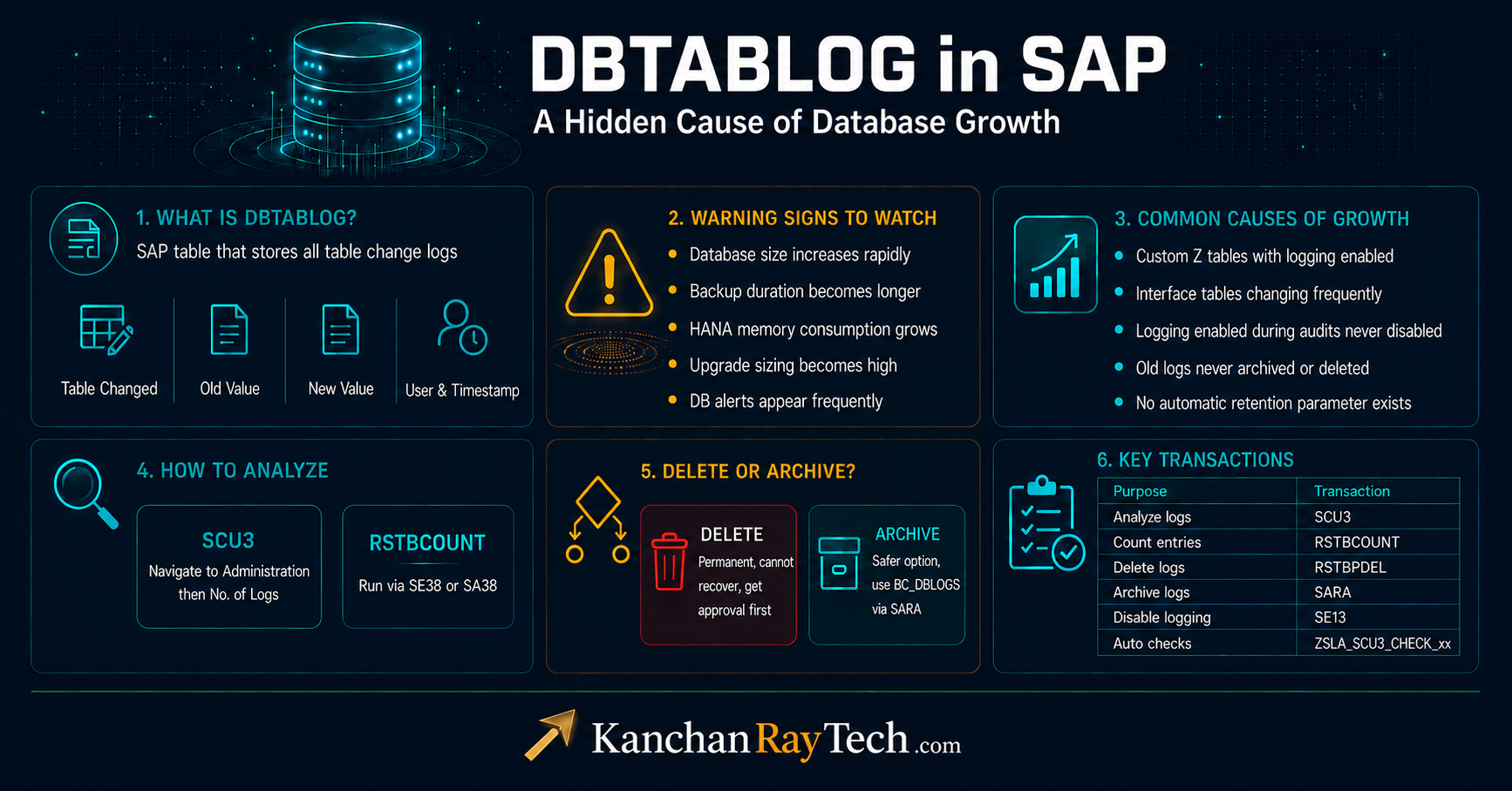
DBTABLOG in SAP: A Hidden Cause of Database Growth
In SAP systems, some tables, such as DBTABLOG, BALDAT, and BALHDR, quietly continue to grow in the background over time. Most of the time, these tables remain unnoticed until they suddenly become a major database size or performance issue.
In this blog post, we will explore what DBTABLOG is, why it grows massively in some SAP systems, and how SAP Basis administrators can analyze, manage, archive, or properly clean it up.
Many SAP Basis administrators first notice it when:
- Database size increases rapidly
- Backup duration becomes longer
- HANA memory consumption grows
- Upgrade sizing becomes unexpectedly high
- DB alerts start appearing frequently
In some productive systems, DBTABLOG alone can consume hundreds of GB or even TBs of space if not monitored properly.
In this blog, let us understand:
- What is DBTABLOG?
- Why does it grow so much?
- How to identify problematic tables?
- How to reduce its size?
- Best practices every Basis consultant should know?
What is DBTABLOG?
DBTABLOG is the SAP table that stores table change logs.
Whenever table logging is enabled, and changes happen in a table, SAP stores the change history in DBTABLOG.
It stores details like:
- Which table was changed
- Old value
- New value
- The user who made the change
- Date and time of change
This functionality is mainly used for:
- Auditing
- Compliance
- Security tracking
- Monitoring critical configuration changes
Why Does DBTABLOG Become Huge?
The answer is simple.
If:
- Logging is enabled for frequently updated tables
- Logs are never archived
- Logs are never deleted
Then DBTABLOG keeps growing continuously. And many times this growth goes unnoticed for years.
One important point many teams miss is that “There is no automatic retention parameter for DBTABLOG.”
The logs remain in the system until they are deleted or archived.
SAP has also clearly mentioned this in their standard SAP Note, “3119320 – DBTABLOG | Retention Period, how to control”.
How to Check Which Tables Generate Most Logs?
Before deleting anything, first identify which tables are generating the highest number of log entries.
SAP provides multiple ways to analyze this.
Method 1: Using SCU3
Execute Tcode SCU3, then navigate to.”Administration → No. of Logs (Selection)” or in newer releases.”Administration → Analysis → No. of Logs“
Now:
- Enter Starting Point
- Enter End Date
- Prefer selecting one day initially
- Execute using F8
If the report times out, run it in background mode
After execution:
- Sort by column
No. of Logs - Use descending order
This quickly shows which tables are generating massive logging.
Method 2: Using Report RSTBCOUNT
Go to tcode SE38 or SA38, then run report “RSTBCOUNT“, provide start date & end date.
Execute the report and sort by.”No. of Logs”
This is another useful method to identify heavily logged tables.
The standard SAP Notes for this activity, “2335086 – DBTABLOG | How to find the tables which have the most log entries in DBTABLOG?”
What Usually Causes Massive DBTABLOG Growth?
In real projects, common reasons are:
- Custom Z tables with logging enabled
- Interface tables are changing very frequently
- Application tables are updated continuously
- Logging was enabled during audits and never disabled later
- Old logs were never archived or deleted
Sometimes a single table can generate hundreds of millions of entries in the DBTABLOG table.
Should You Disable Logging?
This decision should never be taken only by the Basis team.
Always discuss internally with:
- Application owners
- Audit teams
- Security teams
- Compliance teams
- And also with the team, whoever uses that table.
If logging is not required anymore, it can be disabled using tcode SE13.
But before switching off logging, review SAP KBA 1834803 and follow company policies carefully. Because for some business-critical tables, logging may be legally required.
Delete or Archive? Decide Carefully
Once the analysis is complete, the next decision is:
- Delete logs
or - Archive logs
This depends completely on:
- Company retention policy
- Legal requirements
- Audit compliance
- Internal governance standards
Important Warning Before Deleting Logs
This is extremely important.
DBTABLOG is the exclusive storage location for these logs.
Once deleted:
- They cannot be reconstructed
- They cannot be recovered from another SAP table
The only recovery option would be to restore the database backup taken before deletion.
So never perform deletion without proper approval.
How to Delete DBTABLOG Entries?
You can delete logs using:
Option 1: SCU3
Path:
Edit → Logs → Delete
Option 2: Report RSTBPDEL
Run report: “RSTBPDEL"
The standard SAP Note for deletion “2335014 – DBTABLOG | Reduce size”
Important SAP Note Before Running RSTBPDEL:
Before large deletion activities, SAP recommends implementing SAP Note “2755908 – RSTBPDEL – Performance improvement”.
This note improves RSTBPDEL performance significantly.
Without it, deletion may become extremely slow in large systems.
If you plan periodic deletion activities, also review SAP Note: “2388295 – RSTBPDEL | Delete logs periodically”.
Archiving DBTABLOG Entries:
If the business requires retaining logs, archiving is a better approach.
You can archive using Tcode SCU3 or SARA, and archiving objects is BC_DBLOGS
Execute tcode SARA, then
- Enter Archiving Object
BC_DBLOGS - Press
Write - Create/Edit Variant
- Maintain:
- From Date/Time
- To Date/Time
Save the variant.
This allows controlled archiving based on date ranges.
Database Reorganization is Important:
After massive deletion activities, database reorganization should be performed.
Otherwise:
- Database files may not shrink properly
- Space may not be reclaimed effectively
SAP Note 53062 guides database reorganization. This step is often forgotten but is very important.
Practical Things I Personally Recommend:
From practical project experience, these are some very useful practices:
1. Monitor DBTABLOG Regularly
Do not wait until the database size becomes critical.
2. Check High Frequency Tables Monthly
Some tables silently generate millions of logs.
3. Avoid Unnecessary Logging
Not every table needs change logging.
4. Archive Instead of Delete When Needed
Especially in regulated industries.
5. Schedule Periodic Cleanup
Do not allow years of logs to accumulate.
6. Run Large Analysis in Background
SCU3 analysis can timeout in large systems.
7. Use standard note and proper approval
Always follow the standard notes approach for such deletion or archiving activities and take proper approval over email from all the relevant stakeholders.
Useful Transactions and Reports Summary:
| Purpose | Transaction / Report |
|---|---|
| Analyze logs | SCU3 |
| Count log entries | RSTBCOUNT |
| Automatic checks | ZSLA_SCU3_CHECK_xx |
| Delete logs | RSTBPDEL |
| Archive logs | SARA |
| Disable logging | SE13 |
For SAP Basis administrators, this is definitely one topic worth monitoring regularly.